How do I plan delivery routes for multiple drivers?
Short answer
To plan routes for several drivers, group the day’s stops into areas, check that each group fits one vehicle’s capacity, delivery windows and driver shift, then put each group in order and review all routes together. Doing it driver by driver leaves overlaps and late stops, so plan every driver in one run. In Afi Planner you paste or import the orders, add your drivers and shifts, and click Plan routes.
How it works in Afi Planner
Decide who takes which stop before you sequence
With one driver, planning is a question of which stop comes next. With three or more, a second question comes first: which driver takes which stop. A bad split cannot be fixed by good sequencing: two vans crossing the same neighborhood, one driver with a full day while another is done by 1 p.m., a heavy order on the small truck. By hand, this is where spreadsheets and map tabs give out.
- Write the rules down first: for each order the address, service time, delivery window and weight or size; for each driver the shift, breaks, vehicle capacity and any special skill
- Group stops by neighborhood or ZIP, one rough territory per driver, so nobody crosses the whole service area
- Check capacity first, because it is a hard limit, then windows and shifts, then windows and shifts; the planning setup can allow late stops or late finishes (off by default)
- Compare each driver’s total hours and move stops from the longest route to a neighbor with time to spare, then sequence each route and look at all of them side by side; routes that cross the same streets with no time window to explain it usually mean the split is wrong
Plan every driver in one run
Afi Planner is route planning and delivery management software for local delivery teams, made by Afi Labs. Paste orders from Excel or Google Sheets, or drop an .xlsx or CSV file; column names are matched, addresses are checked before anything is planned, and an order imported twice is updated, not doubled. Clicking Plan routes then plans every driver together.
- Drivers carry shifts, with up to four breaks each, plus vehicle capacity in packages, weight or volume, and skills
- Each order can carry one or two delivery windows, a service time, a priority and a required skill
- Optionally prefer drivers who know an area, based on that driver’s last 60 days of deliveries
- A stop that cannot be placed stays off the routes with a plain-English reason, so you can widen a window or add a driver instead of hunting for the missing stop
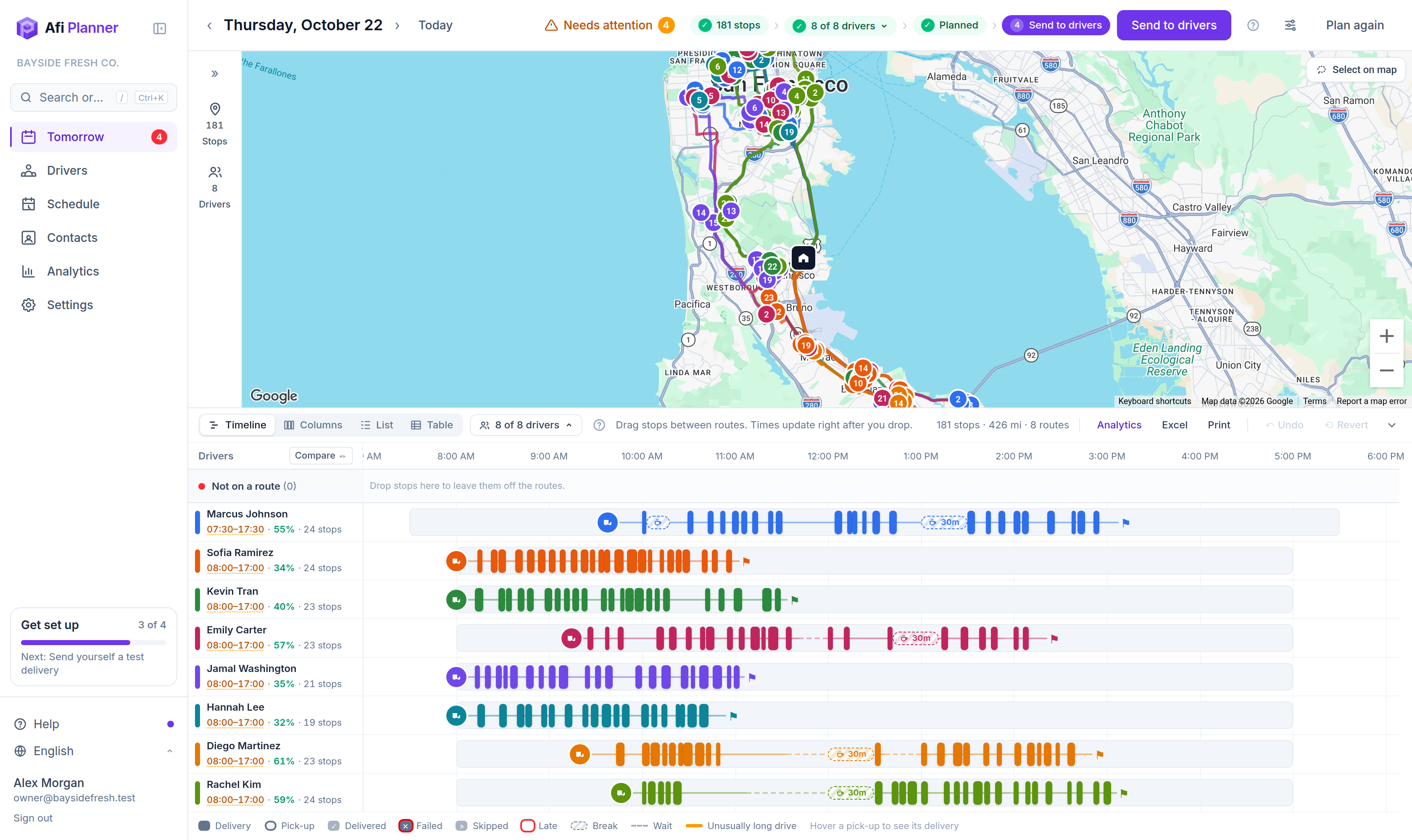
Review, send, and re-plan when someone calls in sick
Look at every route on the day board and map before you send, and move stops where you know better. Afi Planner plans within shifts, windows and capacity, and “Share the work fairly between drivers” (on by default) evens out route hours where those rules allow; windows and distance still come first, so check each driver’s finish time before you send. Drivers open the route in the Afi Driver app on Android or iPhone, or from a text-message link with no install, and navigate in Google Maps, Waze or Apple Maps. If a driver calls in sick, mark the time off in the schedule and plan again.
Try it in the live demo
A fictional delivery company in the middle of its day. Read-only, no sign-up.
Open the live demo →Feature
Route optimization
Optimize delivery routes for your whole fleet in seconds: time windows, capacity, shifts, breaks and skills, with every unassigned stop explained.
13 steps · 6 min read
How to optimize routes and adjust them by hand
Frequently asked questions
How many drivers can one plan cover?
The free trial has no driver limit. A plan holds up to 500 stops on the trial.
Do I have to enter my drivers’ shifts?
You can plan without them, but entering shifts and breaks makes the plan match the real day. A shift can have up to four breaks.
What if a driver calls in sick after I planned?
Mark the driver’s time off in the schedule and plan again; stops that no longer fit are listed with the reason. For orders that arrive after drivers have left, see the answer on adding orders after drivers left.
Can drivers use their own phones?
Yes: the Afi Driver app (Android and iPhone), or a text-message link that opens the route in any phone browser.
More answers
- How do I add new orders after my drivers have already left?
- How can I see exactly what happened on a delivery day, minute by minute?
- Is there one list of everything a dispatcher needs to act on during the day?
- Can my customers track their delivery with a live ETA and see proof of delivery?
- Does the driver app work without a signal?
- How do I import delivery orders from Excel or CSV without mixing up the dates?
- Does Afi Planner have an API with webhooks?
- How should a food and beverage distributor plan truck routes?
- How do I calculate cost per delivery stop?
- Why was a stop left off my routes? Reading unassigned-stop reasons
- What route planning software works for a courier company?
- How do I replace spreadsheet route planning? A 1-day switch plan
- How can I reduce delivery costs? A dispatcher’s checklist
- How many stops per hour should a delivery driver make? And how to measure it
- Route planner vs route optimization software: what is the difference?
- What route software supports recurring weekly deliveries to the same customers?
Plan tomorrow’s routes in minutes
Start your free 3-month trial. No credit card, no setup call, no installation.