What route planning software works for a courier company?
Short answer
A scheduled courier needs software that plans many stops across all drivers at once, respects delivery windows, absorbs orders that arrive after the drivers have left, and gives proof of delivery and a tracking link without extra work. Afi Planner plans every driver in one run, keeps finished stops when you re-plan mid-day, captures photo and signature on the driver’s phone and gives each customer a live ETA page. It is built for routes planned ahead, not for instant on-demand dispatch.
How it works in Afi Planner
A courier day, end to end
A scheduled B2B courier plans tomorrow tonight: a long list of stops, mostly offices, clinics and shops, each with a window, drivers who start at set times and vans that are not interchangeable. Afi Planner is route planning and delivery management software for local delivery teams, made by Afi Labs. Here is how that day runs in it.
- Orders in: paste from Excel or Google Sheets, or drop an .xlsx or CSV file; columns are matched, addresses are checked and an order imported twice is updated, not doubled. A plan holds up to 500 stops on the free trial
- Rules: it plans every driver in one run with your windows, capacity, skills and shifts; the answer on planning routes for multiple drivers lists every rule
- Standing work: standing pickups and deliveries can repeat. Set “Delivers every…” on a customer and the orders are created 14 days ahead, or copy a whole day with “Copy stops from another day”
- One run: Plan routes plans all drivers together, and a stop that cannot be placed stays off the routes with a plain-English reason
- Send: drivers get the route in the Afi Driver app on Android or iPhone, or from a text-message link with no install, and navigate in Google Maps, Waze or Apple Maps
When the day changes
A client calls with a same-day package, a driver is late, a stop fails. Re-planning does not rewrite the part of the day already driven, and drivers hear about changes only when you decide.
- Re-planning mid-day keeps finished stops (delivered, failed, skipped) on the route of the driver who did them, in the order they were done
- Drivers keep the route they have until you click Send updates; each driver then gets one notification with the number of stops added or removed
- An order can start with “Pick up at”, so the drive to collect the package is part of the plan; the answer on adding orders after drivers have left has the detail
Proof of delivery and customer tracking
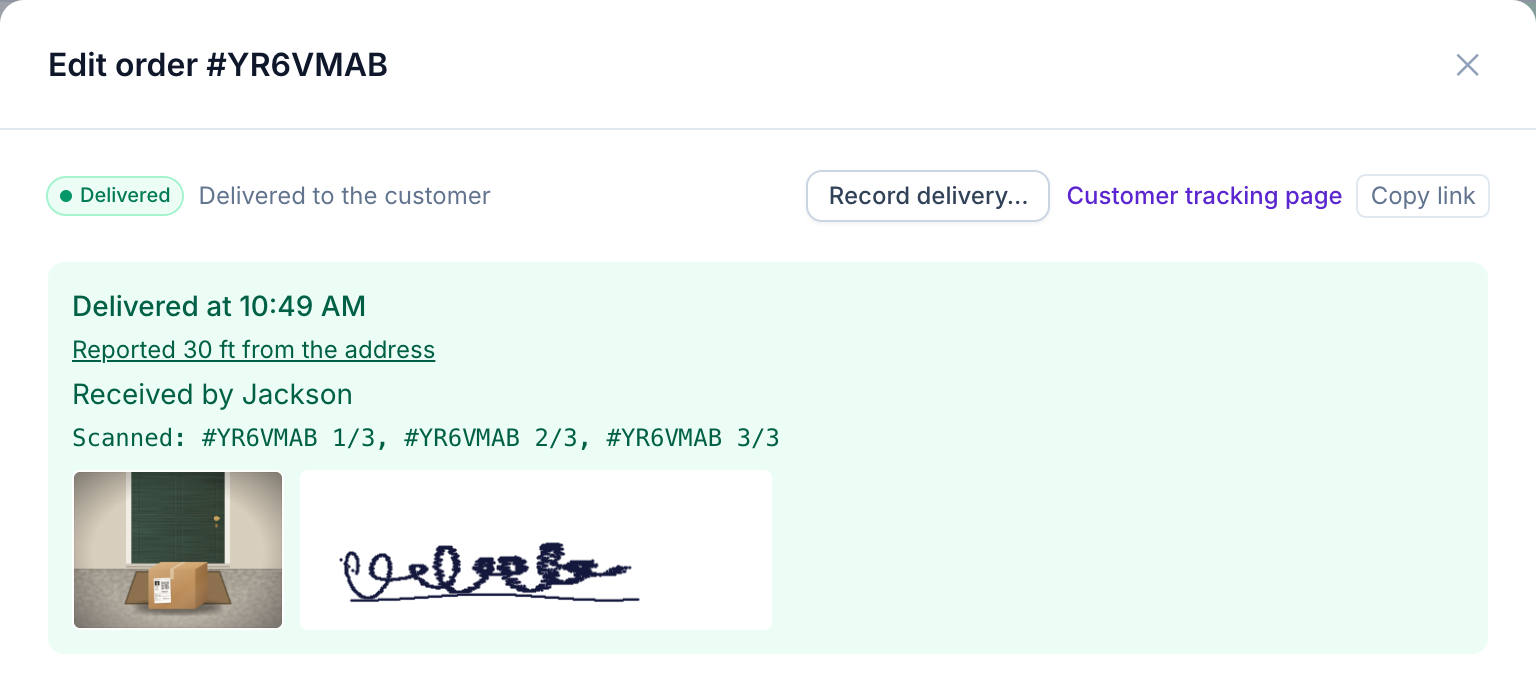
Clients who hand you their deliveries want to see them done. The driver app captures a photo, a signature, the recipient’s name or a barcode scan at the stop, works offline and sends the reports when signal returns. The text-link route page captures photo and signature too. Each order has its own tracking page for the customer.
- The tracking page shows status, a live ETA, the driver’s position only while heading to that customer, photos and a rating
- Email notices are included; SMS goes through your own Twilio account
- Needs attention is one shared list of late, failed and unstarted stops for the dispatcher
What it does not do
There is no Shopify or Zapier app and no ready-made connector to dispatch or billing systems: orders arrive by paste, file or the public API (batches of up to 1,000 orders), and signed webhooks go out. Paid plans are quoted by fleet size and no price is published. It plans a day ahead; it is not an on-demand dispatcher that assigns jobs as they arrive. The free trial lasts three months, no credit card: plan tomorrow’s real stops and judge the routes yourself.
Try it in the live demo
A fictional delivery company in the middle of its day. Read-only, no sign-up.
Open the live demo →Feature
Dispatch & live tracking
Send routes to drivers in one click, follow every van on a live map and get warned before a delivery runs late, with a shared “Needs attention” inbox.
5 steps · 4 min read
Sending routes to drivers and following the day live
Frequently asked questions
How many stops can one plan hold?
Up to 500 on the free trial, with no limit on drivers.
Can I add a same-day order after the drivers have left?
Yes. See the answer on adding orders after drivers have left. Drivers hear about it only when you click Send updates.
Do my drivers have to install an app?
No. They can use the Afi Driver app on Android or iPhone, or open the route from a text-message link in any phone browser.
Can my customers follow their delivery?
Yes. Each order has a tracking page with live ETA, the driver’s position while they head to that customer, photos and a rating.
Does it connect to our dispatch or billing system?
Not through ready-made connectors. There is a public REST API and signed webhooks, available on the free trial too.
More answers
- How do I add new orders after my drivers have already left?
- How can I see exactly what happened on a delivery day, minute by minute?
- Is there one list of everything a dispatcher needs to act on during the day?
- Can my customers track their delivery with a live ETA and see proof of delivery?
- Does the driver app work without a signal?
- How do I import delivery orders from Excel or CSV without mixing up the dates?
- Does Afi Planner have an API with webhooks?
- How do I plan delivery routes for multiple drivers?
- How should a food and beverage distributor plan truck routes?
- How do I calculate cost per delivery stop?
- Why was a stop left off my routes? Reading unassigned-stop reasons
- How do I replace spreadsheet route planning? A 1-day switch plan
- How can I reduce delivery costs? A dispatcher’s checklist
- How many stops per hour should a delivery driver make? And how to measure it
- Route planner vs route optimization software: what is the difference?
- What route software supports recurring weekly deliveries to the same customers?
Plan tomorrow’s routes in minutes
Start your free 3-month trial. No credit card, no setup call, no installation.